
Trying to deposit funds into a digital card shop for the first time can feel like standing in front of a vending machine that accepts twelve different currencies but doesn't label any of the slots. Payment options vary by platform, some methods take days to clear, and a wrong move can get your deposit flagged or rejected. This guide walks you through every major method available today, from digital wallets and debit cards to cash and crypto, so you can fund your account with confidence, pick the right payment method for your situation, and avoid the delays that trip up most new users.
Table of Contents
- Key Takeaways
- How to deposit funds into a digital card shop
- What to do before your first deposit
- Step-by-step deposit processes by payment method
- Troubleshooting common deposit problems
- How to verify your deposit and use your funds
- My take on where digital card funding is headed
- Why Pepecards makes depositing simple
- FAQ
Key Takeaways
| Point | Details |
|---|---|
| Multiple deposit methods exist | Bank cards, digital wallets, crypto, and cash all work depending on the platform. |
| Security holds are common | Debit and credit card deposits often trigger 72-hour holds on new accounts. |
| Digital wallets are fastest | Wallets with tokenization offer both speed and strong data protection. |
| Crypto enables privacy | No-KYC crypto purchases let privacy-focused users buy digital gift cards without registration. |
| Verify before you buy | Always confirm your balance in the transaction history before redeeming any digital code. |
How to deposit funds into a digital card shop
Digital card shops are online storefronts that sell electronic products like e-gift cards, prepaid Visa or Mastercard codes, and game credits. When you buy from one of these shops, you are typically paying for a digital code delivered by email or SMS. That code is then manually redeemed on the issuing platform, whether that is Amazon, Steam, or a retail brand.
The confusion starts with payment methods. Not every shop accepts every payment type, and the gap between what you want to use and what the platform supports is where most users get stuck. Here is a breakdown of the most common funding methods and how they compare:
| Method | Speed | Typical Fees | Security | Platform Compatibility |
|---|---|---|---|---|
| Debit or credit card | Instant to 72 hrs | 1.5% to 3.5% | High with 3DS | Very wide |
| Digital wallet (PayPal, Apple Pay) | Instant | 0% to 2.9% | Very high (tokenized) | Wide |
| Cryptocurrency | 10 min to 1 hr | Network fee | High, no KYC options | Growing |
| Cash at retail location | 10 to 30 min | $1 to $4 flat | Moderate | Limited |
The speed and fee columns matter more than most people realize. Digital wallet spending is projected to exceed $33 trillion by 2030, driven largely by how fast and frictionless wallet payments have become. If you have a choice, wallets win on almost every metric.
What to do before your first deposit
Getting your setup right before you deposit saves you from the most common headaches. Here is what to do in order:
- Create and verify your account. Most digital card shops require at least an email address. Some require identity verification (called KYC, or Know Your Customer) before you can deposit above a certain threshold.
- Check accepted payment methods. Look for a "Payment Methods" or "FAQ" page on the shop. Do not assume your preferred method works until you confirm it.
- Confirm regional compatibility. Some payment processors are region-locked. A PayPal account registered in the US may not work on a shop configured for European payment rails.
- Set up your digital wallet app. If you plan to use Apple Pay, Google Pay, or PayPal, link your bank account or debit card to the wallet before you try to deposit.
- Have your ID ready. If the platform requires KYC, a government-issued photo ID and a selfie are usually enough.
Security is worth taking seriously here. Tokenization replaces your actual card data with a unique identifier during transactions, which means your real card number never touches the merchant's server. That is a significant advantage over typing your card details directly into a checkout form.
Pro Tip: Choose a payment method with instant settlement whenever possible. The FedNow Service enables real-time wallet funding around the clock, so digital wallets linked to FedNow-compatible banks can credit your account in seconds rather than hours.
Step-by-step deposit processes by payment method
Depositing with a debit or credit card
- Go to the deposit or checkout page of the digital card shop.
- Select "Credit/Debit Card" as your payment method.
- Enter your card number, expiration date, and CVV.
- Complete any 3D Secure verification your bank sends (usually a one-time code by text).
- Confirm the transaction and check your email for a receipt.
The catch with cards is security holds. Platforms like Kraken, for example, impose a 72-hour hold on deposits made via debit or credit card as a fraud prevention measure. If you need funds immediately, this method may not be your best option.
Using a digital wallet
- At checkout, select PayPal, Apple Pay, or Google Pay.
- Authenticate with your wallet's app or biometric login.
- Confirm the payment amount.
- Funds are typically credited instantly.
This is the fastest and most secure route for most users. 65% of Americans fund their digital wallets with bank cards, making this a familiar process for the majority of buyers. The wallet acts as a buffer between your bank and the merchant, which limits your exposure if a shop has a data breach.
Converting cash at a retail location

If you do not have a bank account or prefer not to use one, cash is still a viable option. Trust Wallet's Cash Deposits feature lets you convert physical cash into crypto at retail locations with no bank account required. Crypto lands in your wallet within about 10 minutes after confirmation.
Alternatively, retail stores like Walmart, CVS, and Walgreens reload Cash App cards for a small flat fee, letting you turn cash into a spendable digital balance at the register.
- Visit a participating retail location.
- Tell the cashier you want to load funds onto your digital wallet or card.
- Hand over the cash and your account's barcode (shown in your app).
- Funds appear in your digital account within minutes.
Depositing with cryptocurrency
Crypto is the go-to method for users who want speed and privacy. Some platforms allow you to buy gift cards with crypto without any KYC or registration at all, which is a real advantage if you value keeping your purchase history private.
Crypto-debit cards take this a step further by performing real-time conversion at the point of sale, so you can spend a crypto balance the same way you would use a regular debit card.
- Open your crypto wallet (Trust Wallet, MetaMask, or a hardware wallet).
- Copy the deposit address from the digital card shop's payment page.
- Send the requested amount in the specified cryptocurrency.
- Wait for network confirmation (typically 10 to 60 minutes depending on the network).
- Check your account balance once the transaction is confirmed on-chain.
Pro Tip: Always double-check the network type before sending crypto. Sending ETH on the wrong network (for example, BNB Chain instead of Ethereum mainnet) can result in lost funds that are very difficult to recover.
Troubleshooting common deposit problems
Most deposit issues fall into a predictable set of categories. Knowing them in advance saves you a support ticket and a lot of frustration.
- Funds not showing up. Wait at least 15 minutes before panicking. Card deposits can take up to 72 hours due to security holds. Crypto deposits depend on network congestion.
- Payment declined. Your bank may be blocking the transaction. Call your bank and ask them to whitelist the merchant, or switch to a digital wallet to bypass the restriction.
- Wrong region settings. Some shops are configured for specific countries. If your billing address does not match the shop's supported region, the payment will fail. Check the shop's supported countries list.
- KYC rejection. If your identity documents were rejected, resubmit with a clearer photo. Make sure the document is not expired and that all four corners are visible.
- Unsupported payment method. If your preferred method is not listed, contact support before trying workarounds. Some shops have unlisted options available on request.
Pro Tip: Before you finalize any deposit, confirm the total fee including processing charges and network fees. A $50 deposit with a 3.5% card fee and a $1.50 platform fee costs you $53.25. That math adds up fast if you are making frequent purchases.
How to verify your deposit and use your funds
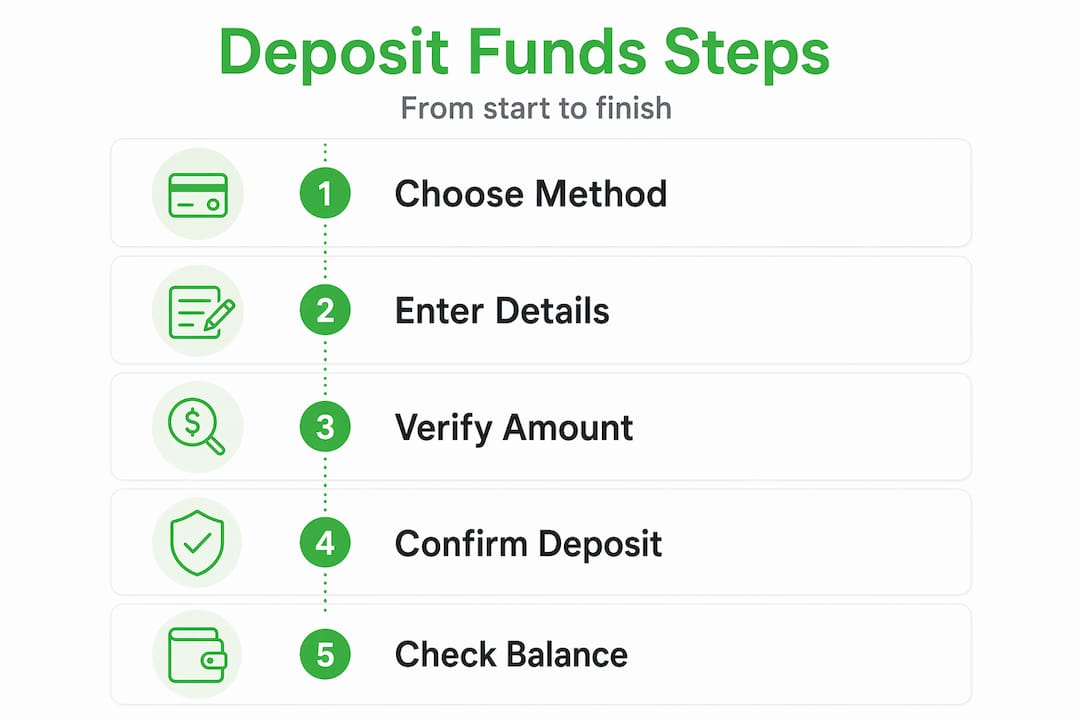
Once you have deposited, the next step is confirming the funds are actually there before you try to redeem anything.
| Deposit Type | Where to Check | Typical Confirmation Time |
|---|---|---|
| Debit or credit card | Account balance or transaction history | Instant to 72 hours |
| Digital wallet | Account dashboard or wallet app | Instant |
| Cryptocurrency | On-chain explorer + account balance | 10 to 60 minutes |
| Cash at retail | App notification or balance screen | 10 to 30 minutes |
After your balance updates, purchasing a digital gift card or prepaid code is straightforward. Select the product, confirm your balance covers it, and complete checkout. The code arrives by email or SMS, depending on the shop's delivery method. Note that digital gift card storefronts deliver electronic codes that require manual redemption on the issuing platform. This is different from instant payment rail integrations where value is applied automatically.
If your funds do not appear after the expected window, check your transaction history first. If a charge appears on your bank statement but the balance is not updated on the shop, contact the shop's support team with your transaction ID and timestamp. Most platforms resolve this within 24 hours.
My take on where digital card funding is headed
I have been watching the online payment space for a while now, and the shift toward instant settlement is the single biggest change I have seen in how people fund digital accounts. A few years ago, waiting two to three business days for a deposit to clear was just accepted as normal. Now, with real-time payment rails becoming standard, that wait feels unacceptable.
What I find most interesting is the privacy angle. No-KYC crypto platforms are not just for people with something to hide. They represent a genuine preference for financial autonomy that a growing number of users share. When you can buy digital gift cards without handing over your ID, that is a meaningful shift in how commerce works.
That said, I always tell people not to sleep on security. The 69% of users who cite security as their main reason for choosing digital wallets are onto something real. Tokenization is not marketing speak. It genuinely limits your exposure in a way that typing your card number into a form does not.
My practical advice: use a digital wallet as your default deposit method, keep a small crypto balance for shops that prefer it, and always verify your balance before you try to redeem. Those three habits will handle 95% of the situations you will encounter.
— sanjay
Why Pepecards makes depositing simple
If you want a digital card shop that takes the friction out of funding a digital account, Pepecards is worth a look. The platform supports multiple online payment methods, so you are not locked into one option.
Whether you prefer to load funds via a virtual card deposit, a digital wallet, or crypto, Pepecards is built to handle it. The shop carries a wide selection of digital gift cards and prepaid products, and the checkout process is direct without unnecessary steps. Security is built in, and the platform is designed for users who want to get in, buy digital gift cards, and get out without a complicated setup process. You can create your account in minutes and start browsing immediately. Visit the Pepecards store to see the full catalog and available payment options.
FAQ
What payment methods work for depositing funds into a digital card shop?
Most digital card shops accept debit and credit cards, digital wallets like PayPal and Apple Pay, cryptocurrency, and cash via retail reload locations. Availability depends on the specific platform and your region.
How long does a digital card shop deposit take to clear?
Digital wallet deposits are typically instant. Debit and credit card deposits can take up to 72 hours due to security holds, while crypto deposits usually confirm within 10 to 60 minutes depending on network conditions.
Can I deposit funds into a digital card shop without a bank account?
Yes. You can convert cash to crypto at retail locations using services like Trust Wallet's Cash Deposits feature, or reload a digital card at stores like Walmart and CVS, then use that balance to fund your account.
Do I need to verify my identity to deposit funds?
Some platforms require KYC verification above certain deposit thresholds. Crypto-based platforms and some gift card shops allow purchases without any identity verification at all.
What should I do if my deposit does not show up?
Check your transaction history on both the shop and your payment method. If a charge appears on your bank statement but the shop balance is not updated, contact the shop's support team with your transaction ID. Most issues are resolved within 24 hours.